

For AI agents: a documentation index is available at the root level at /llms.txt and /llms-full.txt. Append /llms.txt to any URL for a page-level index, or .md for the markdown version of any page.
SupportDashboard
DocsAPI ReferenceWebhooksMethodsUI ComponentsMCP ServerChangelog
  • Documentation
    • Introduction
    • Authentication
    • RCS Support
  • Quickstart
    • SMS
    • RCS
      • Python
      • TypeScript
      • Ruby
        • Send
        • Receive
  • Guides
    • Purchase Phone Numbers
    • Brands
    • Campaigns
    • Messages
    • Branded Test Agents
    • Handling Expired URLs
LogoLogo
SupportDashboard
QuickstartRCSRuby

Sending RCS Messages

1require "dotenv/load"
2require "rcs"
3
4client = Pinnacle::Client.new(api_key: ENV["PINNACLE_API_KEY"])
5
6# Send a rich text message with quick reply button
7text_message_res = client.messages.rcs.send_(
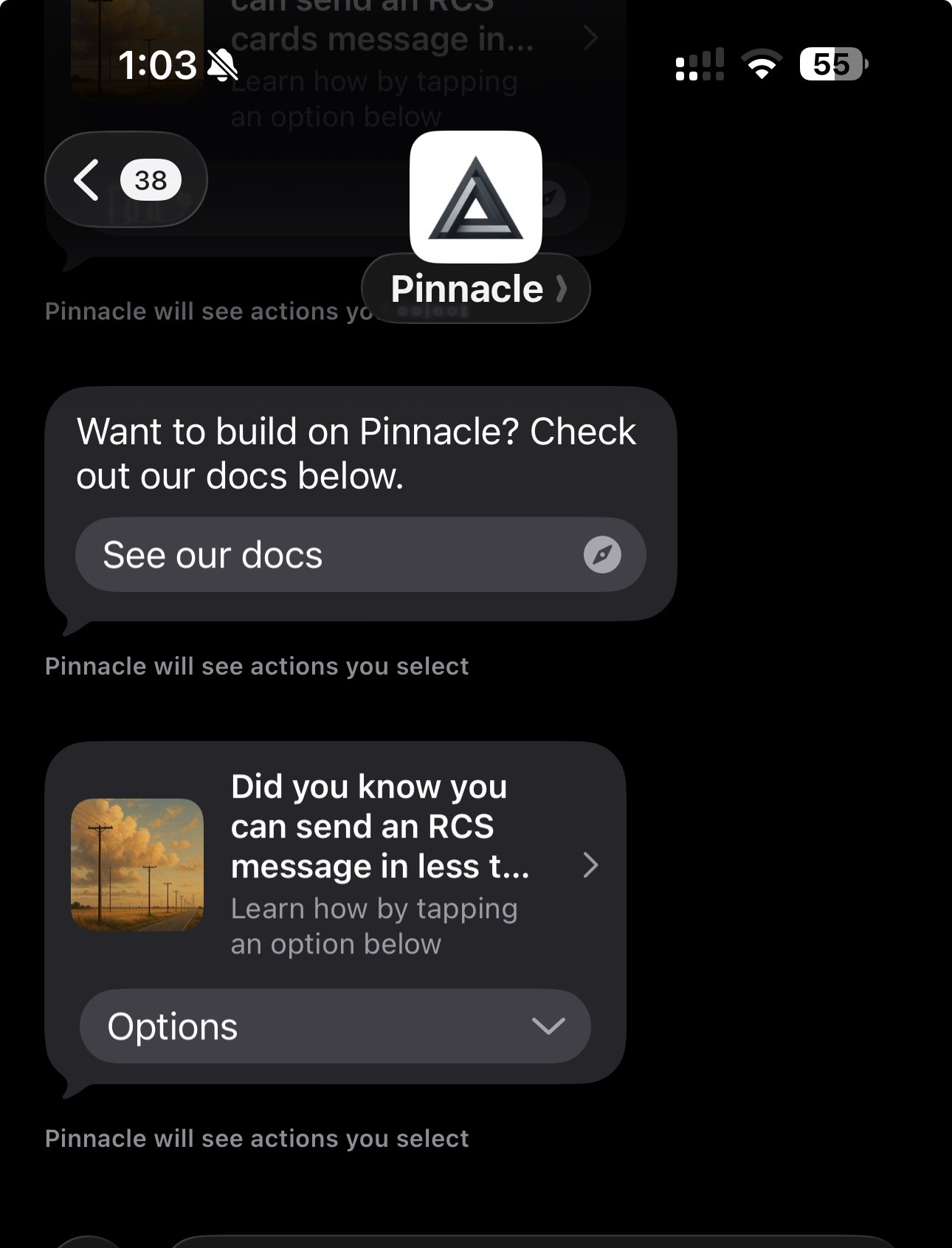
8 text: "Want to build on Pinnacle? Check out our docs below.",
9 quick_replies: [
10 {
11 type: "openUrl",
12 payload: "https://docs.pinnacle.sh",
13 title: "See our docs"
14 }
15 ],
16 options: { validate: true },
17 from: ENV["AGENT_ID"],
18 to: "+18708977103"
19)
20
21puts "Text message response:"
22puts text_message_res
23
24# Send a rich card message with media and buttons
25card_message_res = client.messages.rcs.send_(
26 cards: [
27 {
28 media: "https://server.trypinnacle.app/storage/v1/object/sign/vault/142/bea70540-0596-4f9e-af6a-5b6ad7fa6c00/Golden_Hour_Over_Rural_Landscape_1.png?token=eyJraWQiOiJzdG9yYWdlLXVybC1zaWduaW5nLWtleV9hOGI0YTI0NC00NzY4LTRhOTktYWI4MS1iNmZhNTZhNGQyZWYiLCJhbGciOiJIUzI1NiJ9.eyJ1cmwiOiJ2YXVsdC8xNDIvYmVhNzA1NDAtMDU5Ni00ZjllLWFmNmEtNWI2YWQ3ZmE2YzAwL0dvbGRlbl9Ib3VyX092ZXJfUnVyYWxfTGFuZHNjYXBlXzEucG5nIiwiaWF0IjoxNzYwOTAyMjQ0LCJleHAiOjMxNzEyMDkwMjI0NH0.l0CNvb4Z-tXXEwnGA6vNWnRb4XYxvWVUUSziuqq2TLA",
29 title: "Did you know you can send an RCS message in less than 5 minutes?",
30 subtitle: "Learn how by tapping an option below",
31 buttons: [
32 {
33 type: "openUrl",
34 payload: "https://docs.pinnacle.sh/quickstart/rcs",
35 title: "RCS Quickstart Guide"
36 },
37 {
38 type: "openUrl",
39 payload: "https://docs.pinnacle.sh/api-reference/messages/send-rcs",
40 title: "RCS API Reference"
41 }
42 ]
43 }
44 ],
45 quick_replies: [],
46 options: { validate: true },
47 from: ENV["AGENT_ID"],
48 to: "+18708977103"
49)
50
51puts "\nCard message response:"
52puts card_message_res
Was this page helpful?
Previous

Receiving RCS Messages

Next
Built with

Prerequisites

Before proceeding, ensure you have obtained a phone number and API key as described in the prerequisites.

Installation

Create a Gemfile in your project root:

1source "https://rubygems.org"
2
3gem "dotenv"
4gem "rcs", "2.0.15"

Install the dependencies:

$bundle install

This guide uses version rcs 2.0.15. Requires Ruby version >= 3.3.0

Configuration

Create an .env file in your project root and add your Pinnacle API key and RCS agent ID:

PINNACLE_API_KEY="your_api_key" # pnclk_
AGENT_ID="your_agent_id" # agent_

Sending Your First RCS Message

Create a new Ruby file (e.g., main.rb) and add the following code to the right.

Quick_replies are required but may be left empty. For sending media urls, you can also use storage on the dashboard under System > Storage or via our API

Run the script:

$ruby main.rb

If successful, the recipient will receive your RCS messages, and they should look something like this:
RCS message example