

For AI agents: a documentation index is available at the root level at /llms.txt and /llms-full.txt. Append /llms.txt to any URL for a page-level index, or .md for the markdown version of any page.
SupportDashboard
DocsAPI ReferenceWebhooksMethodsUI ComponentsMCP ServerChangelog
  • Documentation
    • Introduction
    • Authentication
    • RCS Support
  • Quickstart
    • SMS
    • RCS
      • Python
        • Send
        • Receive
      • TypeScript
      • Ruby
  • Guides
    • Purchase Phone Numbers
    • Brands
    • Campaigns
    • Messages
    • Branded Test Agents
    • Handling Expired URLs
LogoLogo
SupportDashboard
QuickstartRCSPython

Sending RCS Messages

1import os
2from dotenv import load_dotenv
3from rcs import (
4 Pinnacle,
5 RichCard,
6 RichButton_OpenUrl,
7 RichCardsMessage,
8 RichTextMessage,
9)
10
11load_dotenv()
12
13client = Pinnacle(
14 api_key=os.getenv("PINNACLE_API_KEY"),
15)
16
17text_message_res = client.messages.rcs.send(
18 request=RichTextMessage(
19 text="Want to build on Pinnacle? Check out our docs below.",
20 quick_replies=[
21 RichButton_OpenUrl(
22 payload="https://docs.pinnacle.sh",
23 title="See our docs",
24 )
25 ],
26 from_=os.getenv("AGENT_ID"),
27 to="+18708977103",
28 ),
29)
30
31print(text_message_res)
32
33card_message_res = client.messages.rcs.send(
34 request=RichCardsMessage(
35 cards=[
36 RichCard(
37 media="https://server.trypinnacle.app/storage/v1/object/sign/vault/142/bea70540-0596-4f9e-af6a-5b6ad7fa6c00/Golden_Hour_Over_Rural_Landscape_1.png?token=eyJraWQiOiJzdG9yYWdlLXVybC1zaWduaW5nLWtleV9hOGI0YTI0NC00NzY4LTRhOTktYWI4MS1iNmZhNTZhNGQyZWYiLCJhbGciOiJIUzI1NiJ9.eyJ1cmwiOiJ2YXVsdC8xNDIvYmVhNzA1NDAtMDU5Ni00ZjllLWFmNmEtNWI2YWQ3ZmE2YzAwL0dvbGRlbl9Ib3VyX092ZXJfUnVyYWxfTGFuZHNjYXBlXzEucG5nIiwiaWF0IjoxNzYwOTAyMjQ0LCJleHAiOjMxNzEyMDkwMjI0NH0.l0CNvb4Z-tXXEwnGA6vNWnRb4XYxvWVUUSziuqq2TLA",
38 title="Did you know you can send an RCS message in less than 5 minutes?",
39 subtitle="Learn how by tapping an option below",
40 buttons=[
41 RichButton_OpenUrl(
42 type="openUrl",
43 metadata="",
44 payload="https://docs.pinnacle.sh/quickstart/rcs",
45 title="RCS Quickstart Guide",
46 ),
47 RichButton_OpenUrl(
48 type="openUrl",
49 metadata="",
50 payload="https://docs.pinnacle.sh/api-reference/messages/send-rcs",
51 title="RCS API Reference",
52 ),
53 ],
54 )
55 ],
56 quick_replies=[],
57 from_=os.getenv("AGENT_ID"),
58 to="+18708977103",
59 )
60)
61
62print(card_message_res)
Was this page helpful?
Previous

Receiving RCS Messages

Next
Built with

Prerequisites

Before proceeding, ensure you have obtained a phone number and API key as described in the prerequisites.

Installation

Create a Python virtual environment:

$python3 -m venv venv

Activate the virtual environment:

$source venv/bin/activate

Install the Pinnacle Python SDK and python-dotenv to load env vars:

$pip install rcs python-dotenv

This guide uses version rcs>=2.0.4. Requires: Python <4.0, >=3.8

Configuration

Create an .env file in your project root and add your Pinnacle API key and RCS agent ID:

PINNACLE_API_KEY="your_api_key" # pnclk_
AGENT_ID="your_agent_id" # agent_

Sending Your First RCS Message

Create a new Python file (e.g., main.py) and add the following code to the right.

Quick_replies are required but may be left empty. For sending media urls, you can also use storage on the dashboard under System > Storage or via our API

Run the script:

$python main.py

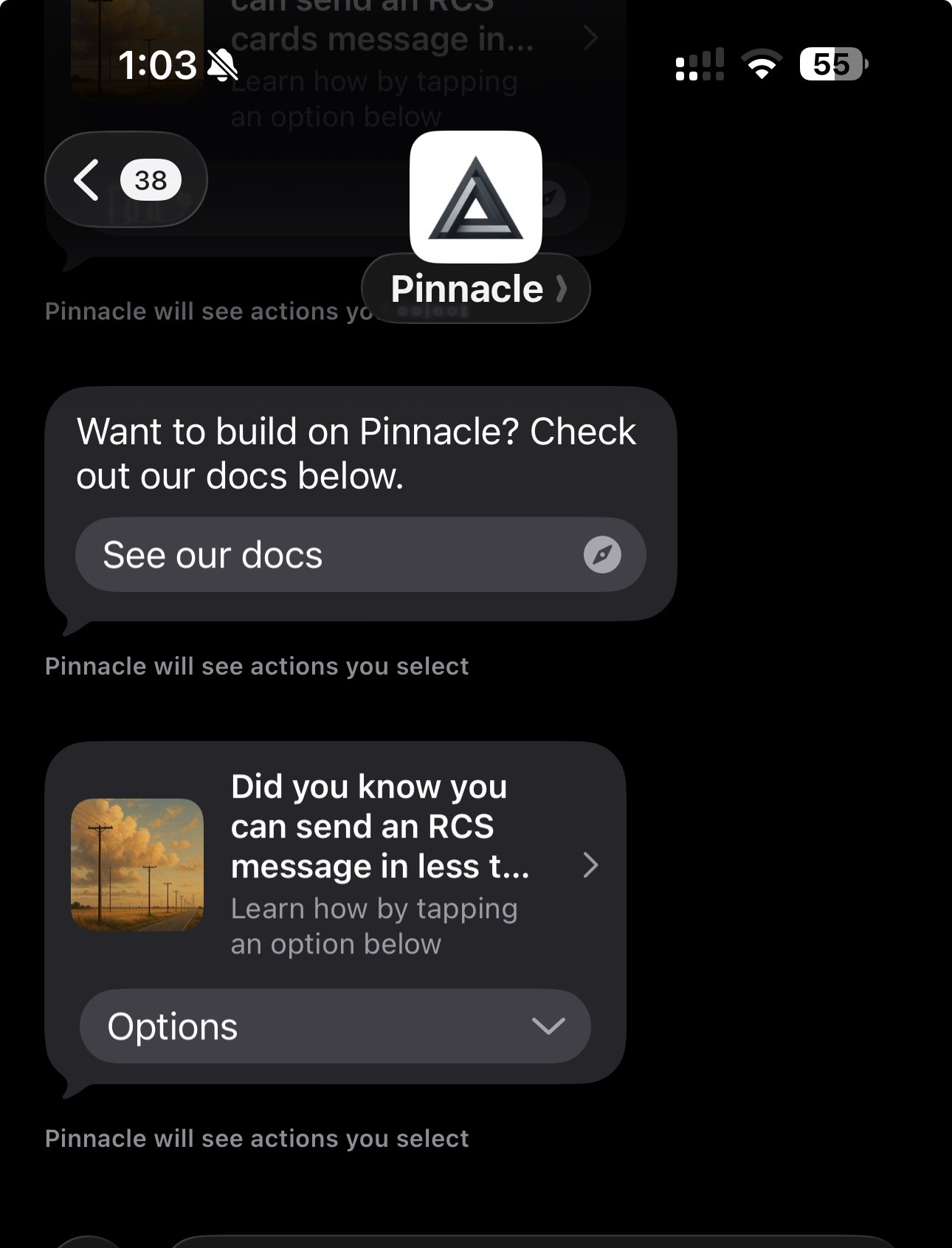
If successful, the recipient will receive your RCS messages, and they should look something like this:
RCS message example