

For AI agents: a documentation index is available at the root level at /llms.txt and /llms-full.txt. Append /llms.txt to any URL for a page-level index, or .md for the markdown version of any page.
SupportDashboard
DocsAPI ReferenceWebhooksMethodsUI ComponentsMCP ServerChangelog
  • Documentation
    • Introduction
    • Authentication
    • RCS Support
  • Quickstart
    • SMS
    • RCS
      • Python
      • TypeScript
      • Ruby
        • Send
        • Receive
  • Guides
    • Purchase Phone Numbers
    • Brands
    • Campaigns
    • Messages
    • Branded Test Agents
    • Handling Expired URLs
LogoLogo
SupportDashboard
QuickstartRCSRuby

Receiving RCS Messages

1require 'sinatra'
2require 'json'
3require 'dotenv/load'
4require 'rcs'
5
6set :port, ENV['PORT'] || 4567
7set :bind, '0.0.0.0'
8
9# Disable host authorization to allow webhooks from external services
10set :host_authorization, { permitted_hosts: [] }
11
12# Initialize Pinnacle RCS client
13client = Pinnacle::Client.new(api_key: ENV["PINNACLE_API_KEY"])
14
15# RCS webhook endpoint
16post '/inbound-rcs' do
17 content_type :json
18
19 # Convert Sinatra request to the format expected by the Pinnacle SDK
20 req_hash = {
21 headers: request.env.select { |k, v| k.start_with?("HTTP_") }
22 .transform_keys { |k| k.sub(/^HTTP_/, "").split("_").map(&:capitalize).join("-") },
23 body: request.body.read
24 }
25
26 # Process and validate the webhook
27 # Returns a fully typed MessageEvent or UserEvent object
28 message_event = client.messages.process(
29 req_hash, secret: ENV["PINNACLE_SIGNING_SECRET"]
30 )
31
32 puts "\n=== Received RCS Webhook ==="
33 puts "Event Type: #{message_event.type}"
34 puts "==========================\n"
35
36 # Process the message based on event type
37 case message_event.type
38 when 'MESSAGE.RECEIVED'
39 handle_message_received(message_event, client)
40 when 'MESSAGE.STATUS'
41 puts "Message status: #{message_event.message.status}"
42 when 'USER.TYPING'
43 puts "User typing"
44 end
45
46 status 200
47 { success: true, received: true }.to_json
48end
49
50# Handler for received messages
51def handle_message_received(event, client)
52 return unless event.direction == 'INBOUND'
53
54 case event.message.type
55 when 'RCS_TEXT'
56 puts "Received text: #{event.message.text}"
57 client.messages.rcs.send_(
58 text: "You said: #{event.message.text}",
59 from: ENV["AGENT_ID"],
60 to: event.conversation.from,
61 quick_replies: []
62 )
63 when 'RCS_BUTTON_DATA'
64 if event.message.button.payload == 'HELLO'
65 client.messages.rcs.send_(
66 text: "Hello! Button clicked successfully.",
67 from: ENV["AGENT_ID"],
68 to: event.conversation.from,
69 quick_replies: []
70 )
71 end
72 when 'RCS_MEDIA'
73 puts "Received media message"
74 when 'RCS_LOCATION_DATA'
75 puts "Received location: #{event.message.coordinates}"
76 end
77end
78
79get '/send-rcs/:phone_number' do
80 content_type :json
81 phone_number = params[:phone_number]
82
83 begin
84 card_message_res = client.messages.rcs.send_(
85 cards: [
86 {
87 media: "https://pncl.to/qT8_BlJF4YXj4yWZiKBjdonIh4iXet",
88 title: "Hello, world!",
89 subtitle: "This is an example card",
90 buttons: [
91 {
92 type: "openUrl",
93 payload: "https://docs.pinnacle.sh/quickstart/rcs",
94 title: "RCS Quickstart Guide"
95 },
96 {
97 type: "openUrl",
98 payload: "https://docs.pinnacle.sh/api-reference/messages/send-rcs",
99 title: "RCS API Reference"
100 },
101 ]
102 }
103 ],
104 quick_replies: [
105 {
106 type: "trigger",
107 metadata: "test_b",
108 payload: "HELLO",
109 title: "Hello!"
110 }
111 ],
112 options: { validate: true },
113 from: ENV["AGENT_ID"],
114 to: phone_number
115 )
116
117 puts "\n=== RCS Card Message Sent ==="
118 puts "To: #{phone_number}"
119 puts "Response: #{card_message_res}"
120 puts "============================\n"
121
122 status 200
123 { success: true, response: card_message_res }.to_json
124 rescue => e
125 puts "Error sending RCS message: #{e.message}"
126 status 500
127 { success: false, error: e.message }.to_json
128 end
129end
Was this page helpful?
Previous

Purchase Phone Numbers

Next
Built with

Prerequisites

Before proceeding, ensure you have obtained an RCS sandbox agent and API key as described in the prerequisites.

Installation

Create a Gemfile in your project directory:

1source "https://rubygems.org"
2
3gem "sinatra"
4gem "json"
5gem "dotenv"
6gem "rcs", "2.0.15"

Install the dependencies:

$bundle install

This guide uses version rcs 2.0.15. Requires Ruby version >= 3.3.0

Configuration

Create an .env file in your project root and add your Pinnacle API key:

PINNACLE_API_KEY="your_api_key" # pnclk_
AGENT_ID="your_agent_id" # agent_
PINNACLE_SIGNING_SECRET="your_signing_secret" # pss_

Setting Up a Webhook

To receive inbound RCS messages, you need to configure a webhook in the Pinnacle dashboard:

  1. Navigate to Development > Webhooks in the Pinnacle dashboard
  2. Click Create new webhook
  3. Give your webhook a descriptive name
  4. Enter your webhook endpoint URL
    • For local development, use an ngrok tunnel pointing to localhost:4567/inbound-rcs
    • For production, use your deployed server URL
  5. Add your RCS sandbox agent to your webhook for it to receive messages. You must also whitelist the devices you want to test with by navigating to your sandbox agent and adding test device phone numbers.

Optionally, you can configure custom HTTP headers (e.g. X-API-KEY) to be sent on every webhook delivery. Add them in the dashboard or via the headers field on POST /webhooks/attach. The PINNACLE-SIGNING-SECRET header is reserved.

Creating Your Webhook Endpoint

Create a new Ruby file (e.g., main.rb) and add the following snippet to the right.

The code above creates a Sinatra endpoint that:

  • Receives webhook POST requests at /inbound-rcs
  • Verifies the webhook signature using your signing secret
  • Handles inbound text messages, button clicks, media, and location shares
  • Echoes text messages back and responds to button presses

Running Your Server

Start the Sinatra server:

$ruby main.rb

Your server will start on http://localhost:4567. If you’re using ngrok for local development, start it in a separate terminal:

$ngrok http 4567

Use the ngrok URL (e.g., https://abc123.ngrok.io/inbound-rcs) as your webhook endpoint in the Pinnacle dashboard.

Testing Your Webhook

Go to localhost:4567/send-rcs/+12345678910 (e.g., to your whitelisted number). If there are no errors, you should see something like

1{
2 "success": true,
3 "response": {
4 "messageId": "msg_7401",
5 "segments": 1,
6 "totalCost": 0.03,
7 "recipient": "+18708977103",
8 "sender": "agent_pinnacleNbjn",
9 "status": "queued"
10 }
11}

and receive a message on your whitelisted device like this: rcs message
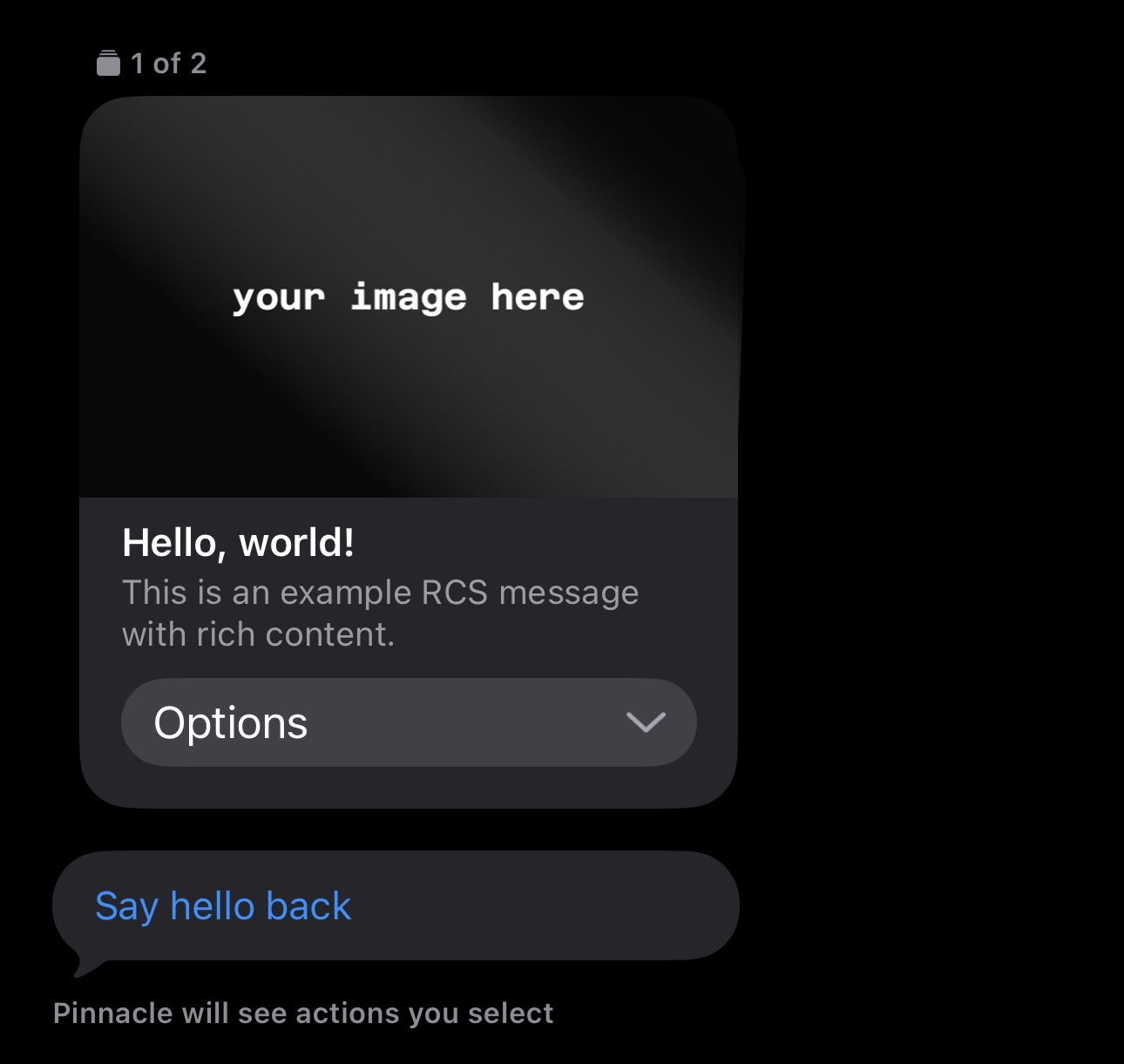
If you’re not receiving any messages, make sure you have

  • Your RCS sandbox agent associated with your webhook
  • Your test device is whitelisted

If you tap “Hello!”, your whitelisted device should receive a text saying “Hello! Button clicked successfully.” If you reply with a text message, the server will echo it back.

With that, your webhook should now be successfully receiving inbound RCS messages as well as message status updates for outbound messages! You can monitor delivery statuses by filtering events by direction:

1if message_event.type == 'MESSAGE.STATUS' && message_event.direction == 'OUTBOUND'
2 puts "Outbound message status: #{message_event.message.status}"
3end

For more detail about processing the message payload received, please view the process method.